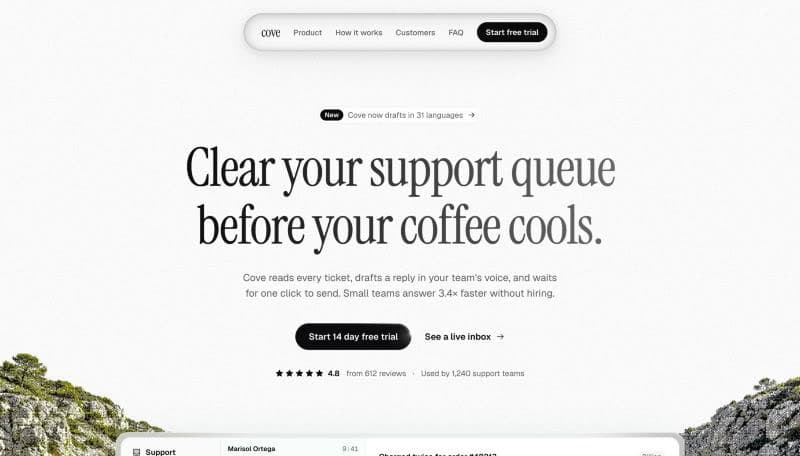
Modern SaaS
A calm, photographic page for a software product. Editorial serif headlines over landscape photography, a scroll drawn onboarding trail and a sticky benefits story.
- Light
- Photography
- Editorial serif
- Scroll stories
Set up
- 1
Download it
For Next.js App Router with React 19, Tailwind CSS v4, and the @/ import alias.
$npx senn-ui@latest add modern-saasPrefer to copy the files manually?
Copy
src/templates/modern-saasfrom GitHub, including its assets and license files. Install its packages:$npm i gsap @gsap/react motion @phosphor-icons/react cnIf your project has no
src/lib/utils.ts(orlib/utils.ts), create it with:export { cn } from "cn"; - 2
Render the template
Add this to
src/app/page.tsx(orapp/page.tsxif your project has no src folder).import Template from "@/templates/modern-saas/page"; export default function Home() { return <Template />; } - 3
Make it yours with your AI agent
Paste into Claude Code, Cursor, Codex or any coding agent. It asks about your product, then rewrites the copy, colors and images.
I'm using the "Modern SaaS" template from Senn (open source, MIT). Turn it into the landing page for my own product.

The template lives in `src/templates/modern-saas/`:
- `content.ts`: every word, number, link and image, plus the data the product mockups show. Most of the work happens here.
- `theme.css`: colors and motion as CSS variables on the `.cove` class.
- `page.tsx`: loads the fonts and puts the sections in order.
- `assets/`: the template's photos, imported in content.ts.
- `sections/` and `components/`: layout and animation. Leave these alone unless I ask.

Steps:
1. Before editing anything, ask me what you need to know in one short list: product name, what it does in one sentence, who it is for, the one action I want visitors to take (sign up, book a demo, join a waitlist…), three or four benefits, real proof (numbers, customer quotes, logos), common questions with answers, brand colors and font preference. Never invent statistics or testimonials. If I don't have something yet, leave a clear TODO in content.ts.
2. Rewrite `content.ts` for my product. Keep the same structure and field names. Write specific, plain copy: concrete outcomes and real numbers, no filler, no buzzwords, sentence case headings.
3. Rebrand: change the wordmark in content.ts, rename the `.cove` class and the `--cove-*` variables to my brand, and rename the page component.
4. Update the colors in `theme.css` to my brand. Check that text stays readable on every photo, in both light and dark areas.
5. Replace the photos in `assets/` with mine, or ask me for them. Keep the imports in content.ts in sync.
6. If the page isn't rendered yet, render it on my home route: import the default export of `src/templates/modern-saas/page.tsx` in `app/page.tsx`.
7. Keep every section, layout and animation. Don't add dependencies.
8. Run the dev server and check the page at desktop and phone widths: no text overflowing, no single word alone on a heading's last line, every link and button pointing somewhere real.
9. Preserve any bundled LICENSE and third party license files when adapting or distributing the template.

Notes for this template:
- The product mockups (the inbox in the hero and the four looping benefit visuals) read their text from `inbox` and `visuals` in content.ts. Rewrite them so they show my product doing its job, with realistic specific details.
- `howItWorks.trail` holds points traced along the path in the valley photo. If you replace that photo, retrace the points (x% and y% of the image) so the drawn line still follows a path, road or river in the new photo.
- Headlines are arrays of lines in content.ts (one entry per line). Keep each line short enough to stay on one line at desktop width.
- Text sits on the empty sky of each photo. When choosing replacement photos, keep a calm, empty area at the top.
- 4
Run it
$npm run devThen open localhost:3000.